The AI Coding Agent Hub
for Windows Developers
Run Cursor, Claude Code, Codex, Antigravity and VS Code (Copilot) in one workspace — with shared context, searchable AI turns and one-click restore.
v1.0.4 · Windows 10/11 · Install via WinGet · No telemetry · Pay once, use forever
Supports the IDEs you already use

Cursor
Electron

Antigravity

Claude Code
MSIX Store

Codex
OpenAI

VS Code (Copilot)
Microsoft
Win32 + MSIX Store apps · Windows 10/11 native · request an IDE
The problem
The Problem with Using Multiple AI Coding Agents
Modern AI-assisted development means juggling 3-5 IDE processes daily. Every one of them is a separate window. None of them remember what the others did. Nothing about your workflow has a real undo button.
Window chaos
Five Cursor windows. Two Claude Code instances. VS Code (Copilot) somewhere in the back. Your taskbar is a graveyard, every Alt+Tab is a roulette spin.
Fixed by → Hub
Memory amnesia
Cursor refactored auth. Claude Code has no idea any of that happened. You have no idea what AI did 47 minutes ago. Re-explaining context is your full-time job.
Fixed by → Continuity + Timeline
No real undo
AI rewrote 12 files in 30 minutes. Half compile, half don't. Git status is a horror movie. There's no clean rollback to that one moment things were fine.
Fixed by → Turn restore + Workspace snapshot
What IDEAgentHub Does for AI-Assisted Developers
The safety net for AI-assisted coding.
Every AI IDE in one window — that's table stakes. The real value: full memory across agents, every turn searchable, every change reversible.
Feature 01
Run Every AI Coding IDE in One Tabbed Workspace
Five Cursor windows. Two Claude Code instances. Where did your VS Code (Copilot) go? Your taskbar is a graveyard, your Alt+Tab cycle is unbearable.
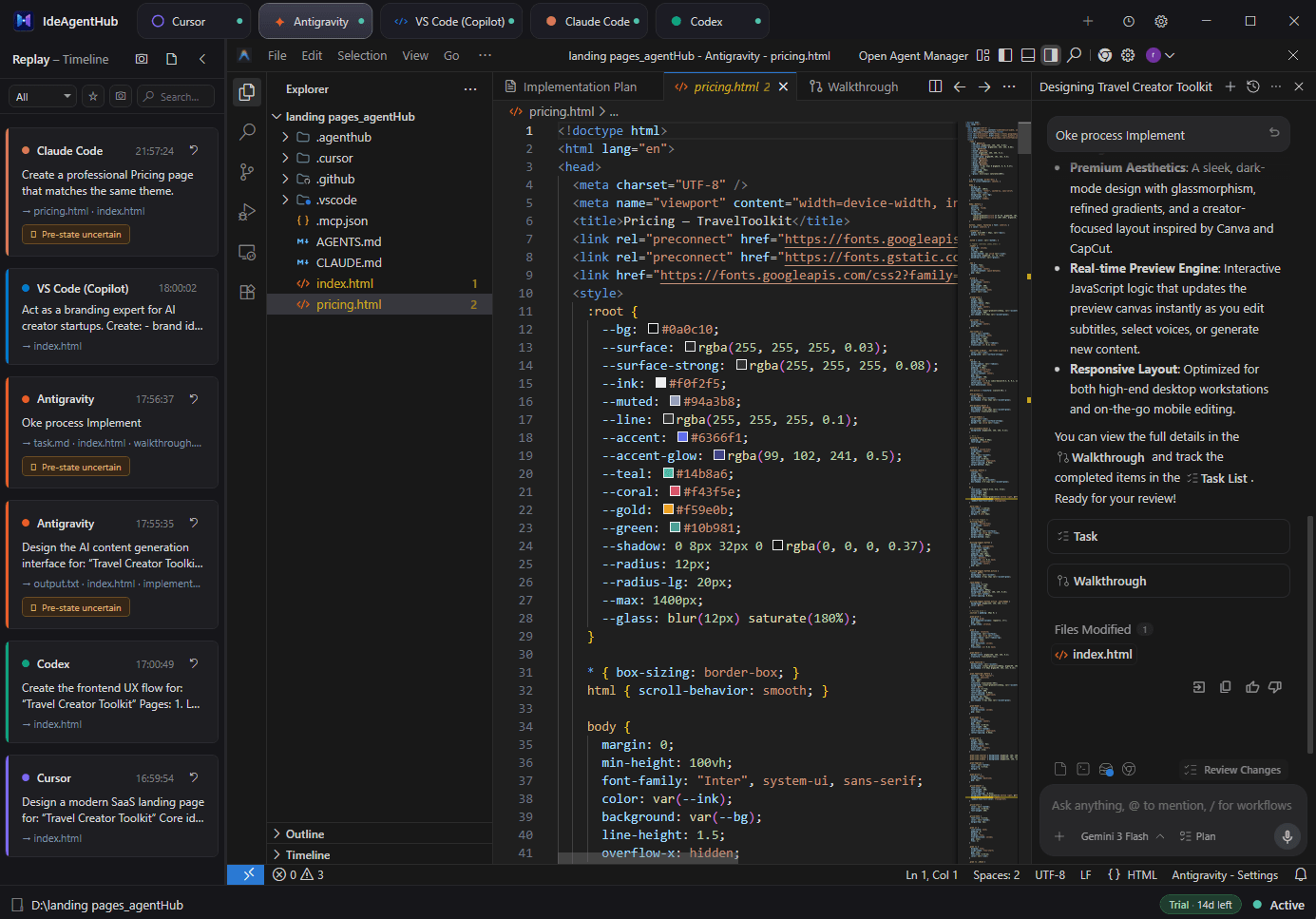
IDEAgentHub embeds Cursor, Antigravity, Claude Code, Codex, and VS Code (Copilot) into a single tabbed Windows app. Switch tabs in 150 ms with a zero-flash crossfade — no flicker, no white flash, no relogin. Each IDE renders natively, so performance stays exactly as you remember it.
- 150 ms zero-flash tab switch with snapshot crossfade
- Native Win32 reparenting — no rendering interception
- Auto-detects every supported IDE on first launch
- MSIX Store apps via COM activation (no UAC prompts)
- Single Alt+Tab entry — sub-IDEs hidden via WS_EX_TOOLWINDOW
Feature 02
Your AI agents understand each other.
You spent 20 minutes in Cursor refactoring auth. You switch to Claude Code — it has zero memory of any of that. Re-explain everything. Again.
IDEAgentHub captures every AI conversation across IDEs and writes a structured handoff log. When you switch from Cursor to Claude Code, the next agent reads exactly what the previous one did — files changed, decisions made, current state. No more re-explaining context to each new agent.
- Auto-parses transcripts from Cursor, Claude Code, Codex, Antigravity, Copilot
- Writes a structured continuity log to .agenthub/ on every IDE switch
- Includes file changes, tool calls, and conversation summaries
- MCP server provisions per workspace — agents read context via tool calls
- Mark blocks as verified to keep them; old ones auto-prune
Feature 03
Every AI turn. Indexed. Searchable.
Cursor wrote that auth module 47 minutes ago. Or was it Claude Code two hours ago? You don't remember. Your terminal is a wall of text. Scrolling won't help.
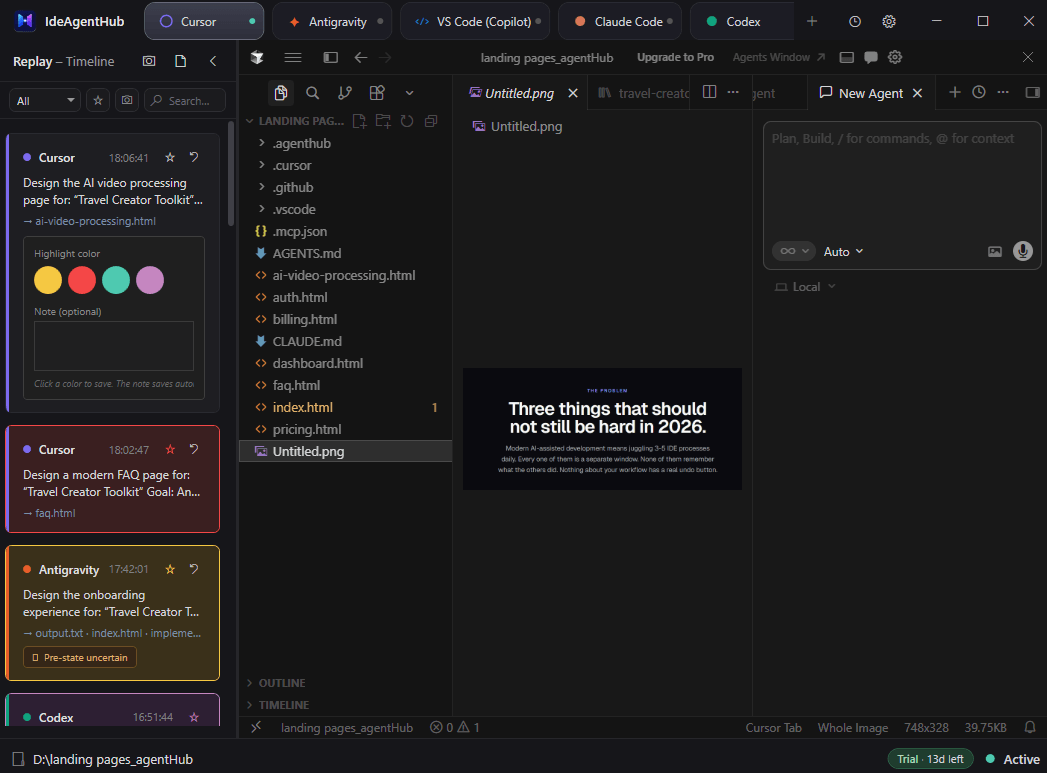
IDEAgentHub records every AI turn — prompt, response, tool calls, files touched — and surfaces them in a unified timeline panel. Filter by IDE, search by content, color-coded per agent. Click any turn to inspect the exact tool calls and the precise code that changed.
- Side panel timeline shows turns from every embedded IDE
- Color-coded per IDE (Cursor purple, Claude red, Codex teal…)
- Search across prompts, responses, tool calls
- Highlights show exactly which files and regions each turn touched
- Doesn't break your IDE flow — collapsible at any moment
Feature 04
Roll back any AI turn. In one click.
AI made the right change 30 turns ago. The next 29 turns built on top of it incorrectly. Your codebase is layered with mistakes. There is no clean undo.
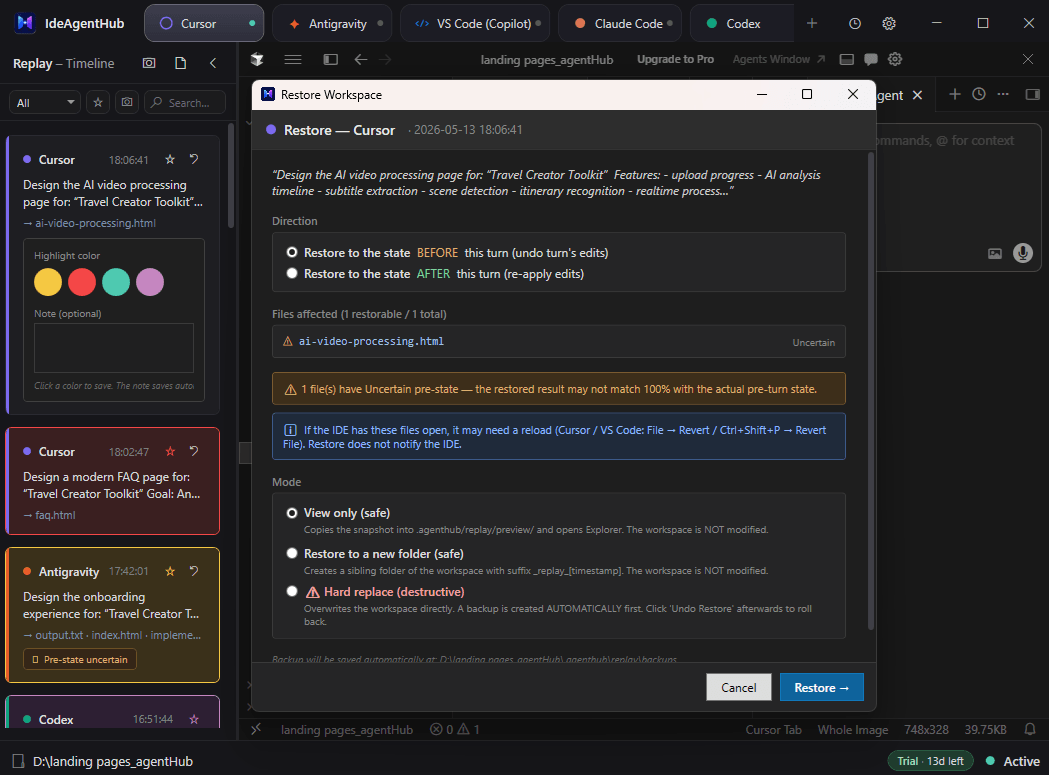
Every AI turn captures pre-state and post-state of every file it touched. Open any turn → review the exact diff → click Restore to revert your codebase to that moment. Like git, but automatic and turn-aware. No manual commits required.
- Pre/post state captured automatically for every turn
- Side-by-side diff viewer for each turn's changes
- Restore individual files or roll back to a turn-level state
- Inspect every tool call the agent made
- Content-addressed storage — efficient even with thousands of turns
Feature 05
Snapshot before AI breaks things.
You let Cursor refactor for 30 minutes while you got coffee. Came back to half the codebase rewritten, nothing compiles, and no clean rollback. Now you panic.
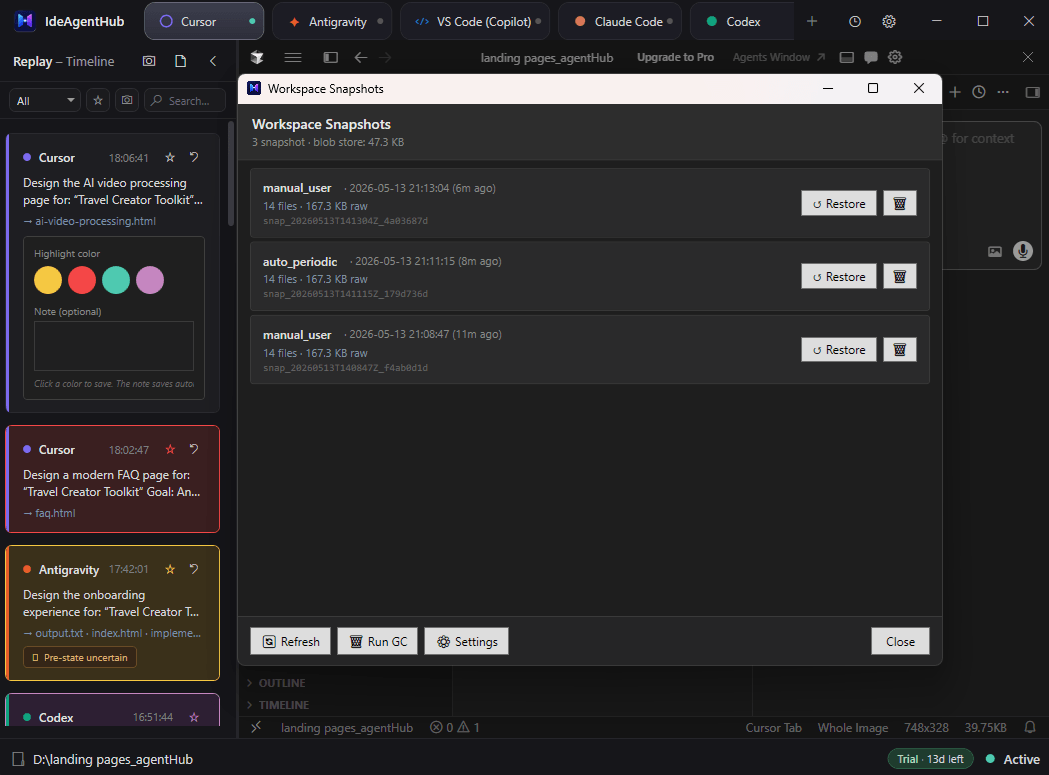
IDEAgentHub auto-snapshots your workspace at intervals you choose, and lets you take manual snapshots before risky AI prompts. When AI goes sideways, restore the entire workspace to a known-good state in seconds. A safety net you can actually trust.
- Auto-snapshot at configurable intervals (e.g., every 10 min)
- Manual snapshot before any prompt you don't fully trust
- Full workspace restore — every file, every state, instant
- Storage cap with smart LRU retention so disk stays bounded
- Atomic writes — snapshots never corrupt mid-save
How it works
Three steps. No configuration.
Install once, point at a workspace, work like you always do — except every IDE you open shares context with the next.
Open a workspace
Pick a project folder from the welcome screen — or jump back to a recent one. IDEAgentHub remembers what you were working on.
Pick an IDE
Hub auto-detects every IDE you have installed — Cursor, Antigravity, Claude Code, Codex, VS Code (Copilot) — with icons and versions ready.
Work like normal
Switch between tabs instantly. Context and chat history sync across agents through .agenthub/ logs. The next agent always knows what the previous one did.
Under the hood
Everything the window handles for you.
Desktop agents are messy — process trees, DPI, auto-updates, half-finished refactors. This is the full index of what IDEAgentHub absorbs so you don't have to.
Embedding & windowing
- Native Win32 reparenting
- Position-sync auto-fallback
- Zero-flash 150 ms tab switch
- Per-monitor-V2 DPI aware
- Single Alt+Tab entry
- MSIX Store app activation
Process lifecycle
- Active · Warm · Suspended · Evicted tab states
- Job Objects — zero orphan processes
- IDE auto-update detection & re-embed
- Crash recovery overlay
- Memory governor for background tabs
Context sync
- Cross-IDE continuity handoff
- Reads each IDE's native session format
- Handoffs are data — never executed
- MCP server: read_handoff_context, mark_handoff_verified
- Rules files auto-provisioned per IDE
Replay & safety
- Unified AI-turn timeline
- Per-turn pre/post diff
- Byte-accurate snapshot restore
- Backup before every restore, rollback on failure
- Workspace snapshots
- Compressed history in your user profile
Licensing & security
- Ed25519-signed license validation
- Device-bound keys — move machines anytime
- 14-day offline grace period
- Clock-rollback protection
- No telemetry on code or prompts
Works with
- Cursor
- Antigravity (Manager + IDE)
- Claude Code
- Codex
- VS Code (Copilot)
- Any Electron app or .exe with a window
Pricing
Pay once. Use forever.
Every license includes one year of updates. When the year ends, the app keeps working — renewing is optional, never forced.
New here? Try everything free for 14 days.
Email-only checkout · no credit card · auto-expires, never charged
Basic
Best for indie devs
Pay once · use forever
- 1 Windows device
- 1 year of updates included
- Every supported AI IDE
- Cross-IDE continuity + turn timeline
- Turn restore + workspace snapshots
- Email support
Keep using your version after the update year ends
Personal
Desktop + laptop
Pay once · use forever
- Everything in Basic
- 2 Windows devices, one owner
- 1 year of updates included
- $19 cheaper than two Basic licenses
Most popular — covers your desktop and your laptop
Team
For the whole team
3 devices minimum · one-time
- Everything in Basic
- Pick your seat count at checkout
- Each member gets their own license key
- 17% off the Basic per-device price
- 1 year of updates included
- One invoice for the whole team
Need 20+ seats or purchasing docs? support@ideagenthub.com
One-time purchase · 1 year of updates included · keep your version forever · 14-day money-back guarantee · VAT/tax handled by Polar
Questions
Frequently asked
Can't find what you're looking for? Email support@ideagenthub.com — we reply within 24h.
One command: winget install IDEAgentHub.AgentHub — WinGet ships with Windows 11 and current Windows 10, and updating later is winget upgrade IDEAgentHub.AgentHub. We recommend it over the direct download because WinGet verifies the package for you and skips the "Windows protected your PC" prompt that Windows shows for any new publisher's downloaded installer. If WinGet is blocked on your machine, the installer and a portable .zip are on the changelog page; choose "More info → Run anyway" if SmartScreen asks.
Windows 10 (build 1809+) and Windows 11. IDEAgentHub uses native Win32 APIs and DirectComposition. macOS and Linux are not supported and there are no plans to support them — the technical foundation is Windows-specific.
No. IDEAgentHub uses documented Win32 APIs (SetParent, SetWindowLongPtr, Job Objects) to host the IDE's main window inside our container. The IDE renders natively — we never intercept its rendering pipeline. Detaching restores the IDE to its original state.
Yes. Every IDE login continues to work normally because the IDE process runs natively. IDEAgentHub doesn't touch your account credentials. If Cursor is already running when you launch IDEAgentHub, we attach to your existing session instead of spawning a duplicate.
IDEAgentHub watches each IDE's transcript files (Cursor JSONL, Claude Code session files, Codex events, Antigravity Language Server, Copilot details). Every AI turn is parsed into a structured record with prompt, response, tool calls, and the files it touched. Records appear in the side panel timeline, color-coded per IDE. Storage is content-addressed so it stays compact.
Yes. IDEAgentHub takes auto-snapshots at intervals you set (default off — you opt in) and you can take manual snapshots at any time. A snapshot captures every file in your workspace (with sensible ignore rules for node_modules, .git, build outputs). Restoring writes everything back atomically. There's a configurable storage cap with LRU retention so disk stays bounded.
When you switch IDEs, IDEAgentHub appends a structured handoff block to .agenthub/continuity-log.md in your workspace — what the previous IDE just did, files changed, key decisions. Per-workspace MCP server provisioning means agents read this context via tool calls, not raw file scraping. Old blocks auto-prune after they're marked verified.
Out of the box: Cursor, Antigravity, Claude Code, Codex, and VS Code (Copilot). The supported set is curated — each IDE goes through tested embed + transcript parsing so the AI turn timeline and context handoff just work. Want another IDE added? Email support@ideagenthub.com with the IDE name and we'll evaluate it for a future release.
Each license is bound to your hardware fingerprint (HWID = SHA256 of MachineGuid + Motherboard UUID + CPU ID). Basic covers 1 Windows device, Personal covers 2, and Team covers the number of seats you buy. You can revoke a device from your account dashboard and activate a new one in seconds, so moving between work and home machines is easy. Online validation runs every 24 hours; 14-day offline grace period if you're traveling.
Nothing breaks. Your license is perpetual — the version you have keeps working forever, offline validation included. The one-year window only covers app updates: new releases published after your window ends require an optional update renewal. No subscription, no lock-out, no read-only mode.
No telemetry from the desktop app. We track aggregate purchase events through Polar (our payment processor) and basic activation events on our license server. Your code, prompts, AI conversations, and IDE state never leave your machine.
14-day money-back guarantee, no questions asked. Refunds processed by Polar (Merchant of Record). Email support@ideagenthub.com to request.
Move fast. Without breaking things.
Try IDEAgentHub free for 14 days. No credit card. Cancel with one click. Keep every AI IDE you already use — and the safety net you didn't know you needed.
Windows 10/11 · 200 MB · One command: winget install IDEAgentHub.AgentHub